The Famous-Viewpoint Checklist Can Flatten a Place
A famous-viewpoint checklist can crowd out a destination’s quieter character. Learn how to notice local use, built features, and context around scenic stops.
A famous-viewpoint checklist can make a Western destination feel like a string of photographs instead of a place shaped by daily choices. Keep the celebrated overlooks, but also notice who maintains the sites, what visitors are asked to do, and how the built setting influences your experience.
These seven checklist items focus on stewardship and visitor behavior, rather than treating every roadside feature as a clue to the landscape. They can help you enjoy a landmark while respecting the people and systems that make access possible.
Check who manages the site
Look for the agency or organization named on entrance signs, maps, or information boards. A site may be managed by a national park, a state agency, a tribal government, a county, or a private operator; the manager’s name tells you where to look for current rules and notices.
If the sign identifies a manager, use its posted guidance; if there is no clear manager, rely on visible closures and ask staff or a visitor center before taking an uncertain route. Do not infer access rights from the scenery or from an unmarked track.
Check the rules before leaving the developed area
Read notices about closed trails, fire restrictions, pets, and permitted activities before walking away from a parking area. Rules can differ between neighboring parcels, so a permission sign at one entrance does not necessarily apply beyond it.
If a route is marked open and fits your plans, stay on it; if a closure or restriction applies, choose another signed route or remain in the developed area. It is not worth the effort to hunt for a way around a barrier: the extra detour can damage sensitive ground and leave you unsure whether you are allowed there.
Check what the overlook is designed to protect
Railings, paved paths, and viewing platforms often guide visitors away from unstable edges or delicate surfaces. The built features are not distractions from the view; they are part of how a crowded site can accommodate people while limiting wear.
If a designated platform provides a clear view, use it; if it is closed or crowded, wait or choose another signed viewing area rather than climbing a barrier or stepping onto a slope. The decision keeps your visit within the site’s intended boundaries.
Check how the place shares space
At a popular stop, observe the marked parking spaces, accessible routes, loading areas, and walking paths. These features affect how visitors move through the site and whether someone can reach the view without crossing traffic or rough ground.
If a route or space is marked for a particular purpose, leave it available for that use; if the main area is congested, wait for a quieter moment or visit another public stop. Avoid blocking a path for a photograph, even briefly, because other visitors may need the route.
Check what you can learn without approaching people
Interpretive panels, public art, and visitor-center displays can explain local history or land management without requiring you to question residents. Read the source and date on a display when available, and distinguish its stated information from your own impressions.
If the site provides public interpretation, use it as context; if it does not, keep your conclusions modest and avoid treating a passing observation as a complete account of a community. Do not photograph people, homes, or personal information without permission.
Check whether a photograph includes more than the intended view
A camera frame can capture a private entrance, a license plate, or people who did not choose to be part of your image. Before taking or sharing a photograph, look at its edges and background as well as the landmark.
If the frame includes people or private details, change the angle, wait, or leave the image unshared; if it shows only the public setting, it is less likely to expose someone’s personal space. A photograph does not need every element visible from the overlook.
Check your notes for observation and interpretation
A useful travel note separates what you saw from what you think it means. “The path is closed at the signed gate” records an observation; “the managers do not want visitors here” adds an assumption that the sign may not support.
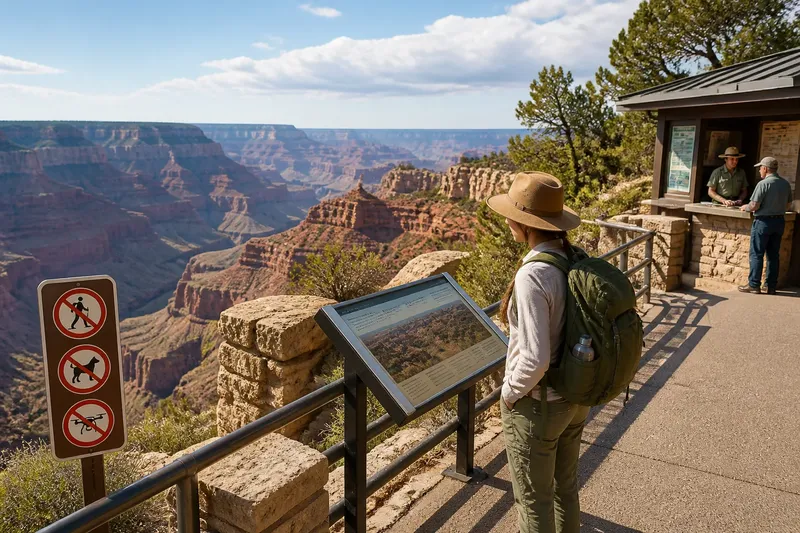
Say you arrive at a canyon overlook and see a closed spur, a staffed information kiosk, and a marked paved viewing area. You note the closure and read the kiosk notice, which directs visitors to the viewing area; you then stay on the marked route and record that the spur was closed, without guessing why. The result is a specific, useful memory that respects the posted direction.
What should you check before and during a viewpoint visit?
How do I find the right rules for a viewpoint?
Check the entrance signs, on-site map, or visitor-center information for the named manager and current notices. If a route or activity remains unclear, ask staff rather than relying on a track that merely looks accessible.
What should I do when a viewpoint is crowded?
Keep paths and accessible areas clear, and wait for space if you want to use a designated viewing point. If the crowd does not thin, choose another signed stop instead of stepping beyond a barrier.
Can I photograph a public overlook?
Follow posted rules and consider what else the frame captures. If it includes identifiable people or private details, adjust the angle, wait, or do not share the image.
How can I make travel notes without overinterpreting a place?
Write down visible details first, then mark any explanation as a question or tentative thought. That keeps a memorable observation from becoming an unsupported claim about local people or site management.
A famous-viewpoint checklist is most useful when it supports considerate decisions, not when it dictates how many places you must see. Use these checks to respect posted access, shared facilities, and other people’s privacy; a brief, attentive visit can be more rewarding than collecting another image without context.